

Basic guide for debugging the zero point, pressure value, and unit of pressure transmitter using the AILEIKE HART handheld device ALK475TREX
This guide provides standardized operational instructions for on-site commissioning and calibration of pressure transmitters (HART protocol) using the ALK475TREX (Chinese version) HART handheld device as a tool. The handheld device comes with two wiring modes: 24V, feeder, and external power supply with a 250Ω resistor, which can adapt to different on-site power supply conditions. It includes complete operational steps for zero calibration, fine adjustment of high and low range segments, and modification of pressure units. The menu path is clear and the operational instructions are explicit, guiding on-site personnel to complete transmitter commissioning and routine maintenance calibration in a standardized manner.
1. Preparatory work
Prepare an ALK475TREX (Chinese version) HART handheld communicator, a pressure transmitter (HART protocol), and a handheld communicator communication cable.
Tool connection
• Wiring method 1 (the ALK475TREX handheld communicator comes with a built-in 24V power supply, which can provide power to the transmitter):
(1) First, plug the communication cable connector into the communication interface of the handheld device (note: connect the positive pole of the communication cable connector to the positive pole of the handheld device's communication interface, and connect the negative pole to the negative pole). Then, turn on the 24V power supply.
(2) The other end of the communication cable is clamped onto the transmitter, with the red alligator clip on the positive terminal and the black alligator clip on the negative terminal of the transmitter.
(3) Complete the wiring, and ensure that the handheld device successfully supplies power to the transmitter.
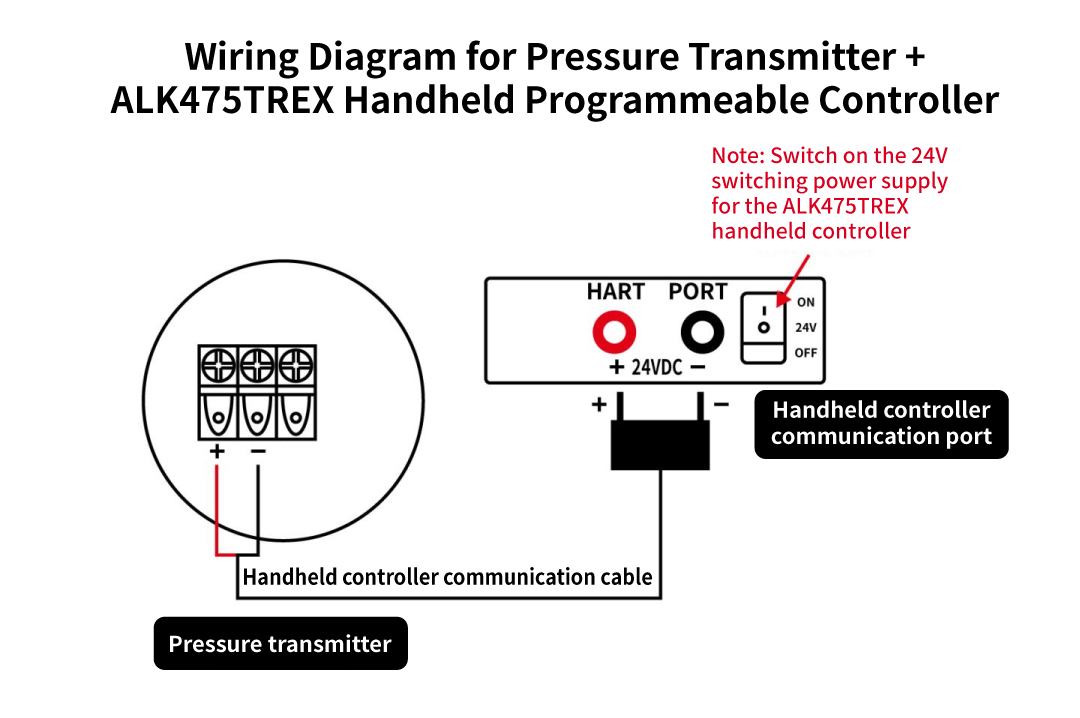
Wiring diagram (I)
• Wiring method 2 (external power supply wiring for ALK475TREX handheld operator):
Additional preparations are required: an external 24V power cord and a 250Ω resistor
(1) First, connect the positive terminal of the external 24V power cord to the positive terminal of the transmitter power supply. Then, connect a 250Ω resistor to the negative terminal of the transmitter
(3) Connect the negative terminal of the external 24V power cord to the other end of the 250Ω resistor
(3) Plug the communication cable connector into the communication interface of the handheld device (Note: Connect the positive pole of the communication cable connector to the positive pole of the handheld device's communication interface, and connect the negative pole to the negative pole). Additionally, clamp the other two alligator clips on both sides of the 250Ω resistor
(4) Finally, connect the external 24V power cord to the power supply. After all devices are successfully connected, take out the handheld device and turn it on. You can see that the handheld device has successfully communicated with the pressure transmitter.
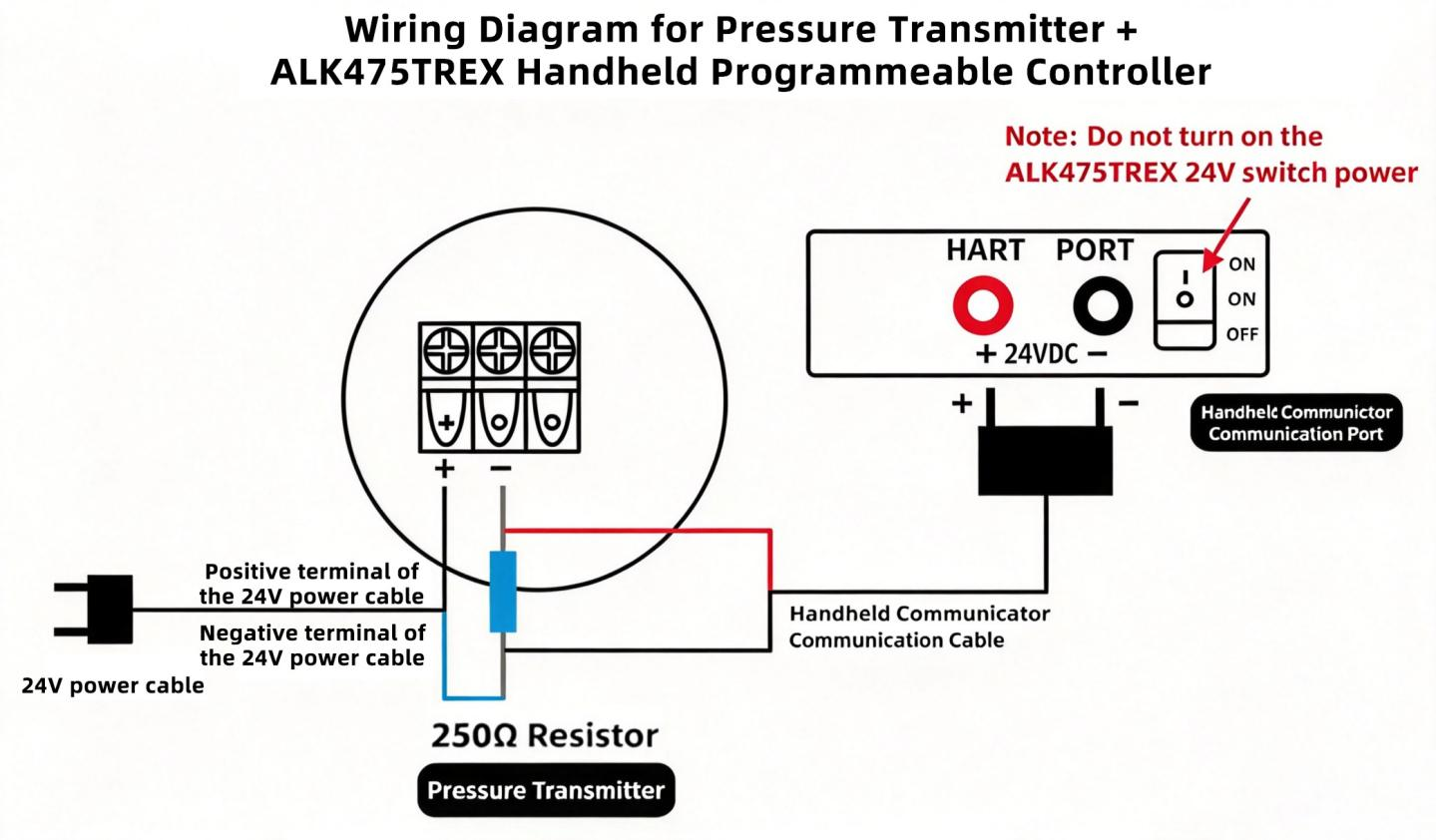
Wiring diagram (II)
• The pressure transmitter shows a value other than 0 when exposed to atmospheric pressure. Take out the HART handheld device to calibrate the transmitter zero point.
II. Zero-point calibration operation process
Currently, the handheld device and the pressure transmitter have successfully established communication. The specific operation is as follows:
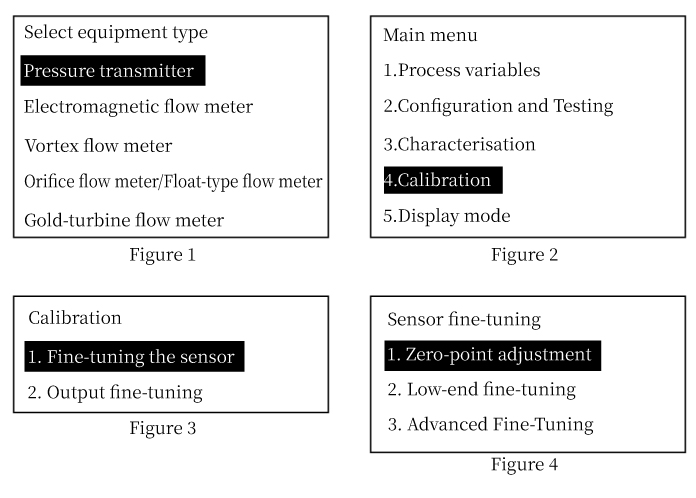
(1) Select the pressure transmitter (see Figure 1) and press the right button to enter the pressure transmitter interface
(2) Press the key to select calibration (see Figure 2), and press the right key to enter the calibration interface
(3) Select "Sensor Tuning" (see Figure 3) and press the right button to enter the sensor tuning interface
(4) Select zero point fine adjustment (see Figure 4), right-click to confirm, and the pressure transmitter zero point calibration is successful
III. Operation process of low-range segment fine adjustment/high-range segment fine adjustment
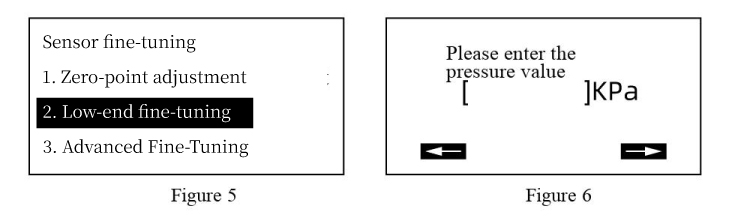
1. Fine-tune and calibrate the transmitter pressure value at the low range segment
• When the transmitter verifies a pressure value, but the actual pressure measured by the transmitter is lower than this value, it is necessary to select a low-range trim for calibration.
• Select the low-range segment for fine adjustment (see Figure 5), press the right button to enter, input the actual pressure value (see Figure 6), press the right button to confirm, and the pressure value calibration is successful.
2. Fine-tune and calibrate the pressure value of the transmitter at the high-range segment
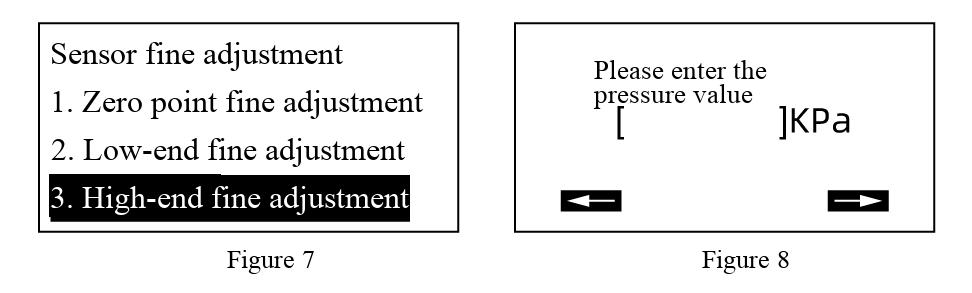
• When calibrating a pressure value with a transmitter, if the actual measured pressure value is higher than this value, it is necessary to select a high-range trim for calibration.
• Select the high-range segment for fine adjustment (see Figure 7), press the right button to enter, input the actual pressure value (see Figure 8), press the right button to confirm, and the pressure value calibration is successful.
IV. Modify the unit of the pressure transmitter
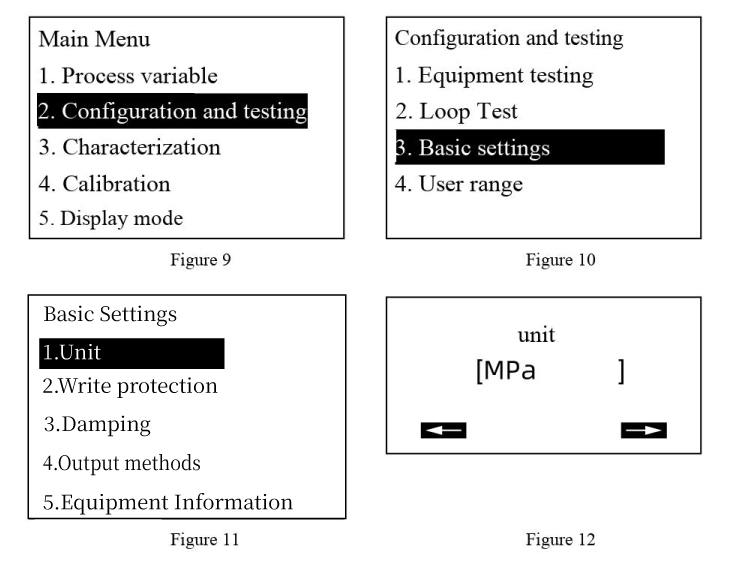
(1) Return to the main menu page, press the key to select "Configuration and Testing" (see Figure 9), and press the right button to enter the "Configuration and Testing" interface
(2) Press the key to select Basic Settings (see Figure 10), and press the right key to enter the Basic Settings interface
(3) Select a unit (see Figure 11), and right-click to enter the unit interface (see Figure 12)
(4) Next, press the up and down keys to select the desired unit, and finally press the middle key to confirm. The unit of the pressure transmitter is successfully modified